
For product examples, readers can explore the AKSIGHT red dot sight collection, including compact optics, enclosed emitter designs, and OEM/ODM-ready solutions for commercial applications.
🔍 1. Why Red Dot Brightness Settings Matter
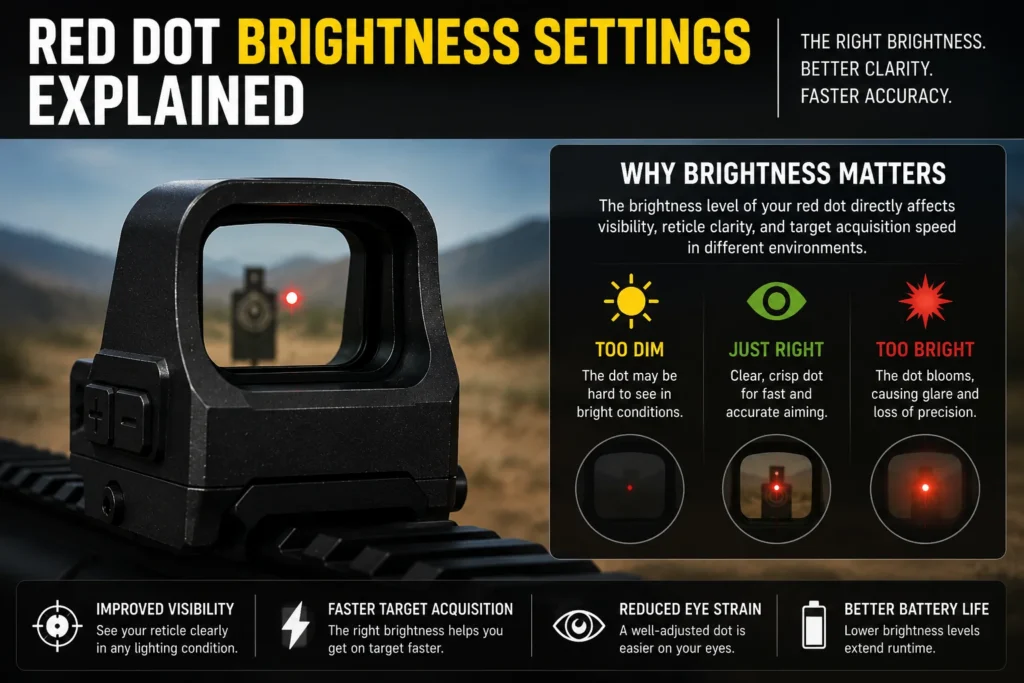
A red dot sight projects an illuminated aiming point onto a coated lens surface. The brightness level determines how visible and defined that reticle appears to the human eye.
If brightness is set too low, the reticle may disappear against bright backgrounds. If brightness is too high, the reticle can appear oversized, blurry, or star-shaped — commonly called blooming.
- ☀️ Bright environments require stronger illumination
- 🌙 Low-light environments require reduced brightness
- 🎯 Proper settings improve reticle sharpness
- ⚡ Correct brightness increases target acquisition speed
- 🔋 Lower settings help preserve battery life
The ideal brightness level is bright enough to remain visible without causing glare or distortion.
🌞 2. How Lighting Conditions Affect Red Dot Visibility
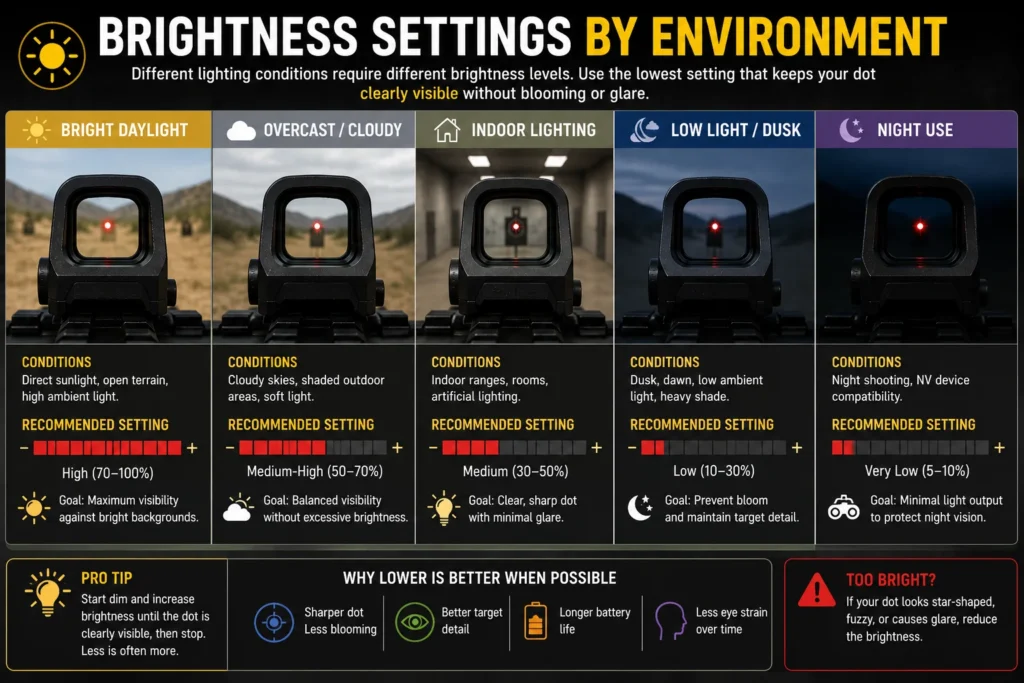
Different environments dramatically change how the reticle appears. A brightness setting that works perfectly outdoors may become unusable indoors or at night.
☀️ Bright Daylight Conditions
Direct sunlight creates the highest demand on illumination systems.
In outdoor conditions, the reticle must remain visible against bright backgrounds such as concrete, dry terrain, reflective surfaces, or open sky.
- Higher brightness levels are usually required
- Weak emitters become difficult to track
- Lens coatings affect reticle contrast
- Excessive brightness may create bloom
Quality optics maintain a crisp dot even at maximum daylight settings.
🏠 Indoor Lighting
Indoor environments typically require moderate brightness settings.
Overpowered illumination indoors often causes reticle distortion and eye strain. A cleaner, sharper aiming point improves visual comfort and tracking speed.
🌙 Low-Light and Night Use
Low-light environments require much lower brightness output.
An overly bright reticle can overpower the target image, reducing visibility and slowing focus transitions.
- Reduced brightness improves precision
- Lower settings reduce glare
- Fine brightness increments become important
- Night-compatible settings improve usability
🔭 3. Types of Red Dot Brightness Systems
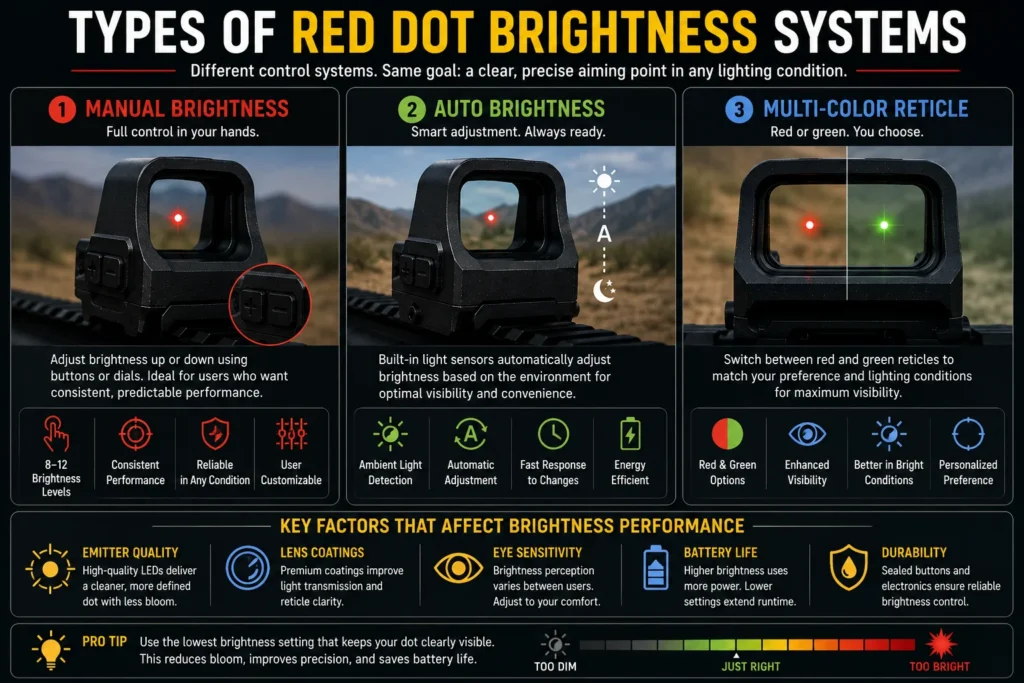
Modern optics use different illumination control systems depending on design goals, intended use, and manufacturing cost.
🎛️ Manual Brightness Adjustment
Manual systems allow users to control brightness directly using buttons or rotary dials.
- Reliable operation
- Consistent control
- Preferred by experienced users
- Usually includes 8–12 brightness levels
Most professional-grade optics still rely on manual systems for predictable performance.
⚡ Auto Brightness Systems
Auto-brightness optics use ambient light sensors to adjust illumination automatically.
The system increases brightness outdoors and lowers intensity in darker environments.
- Hands-free adjustment
- Faster adaptation to changing conditions
- Useful for dynamic environments
- Can occasionally overcorrect in mixed lighting
🟢 Multi-Color Reticle Systems
Some optics support both red and green reticle modes.
Green reticles may appear brighter to some users during daylight conditions, while red remains the industry standard for general-purpose optics.
🎯 4. Key Factors That Affect Red Dot Brightness Performance
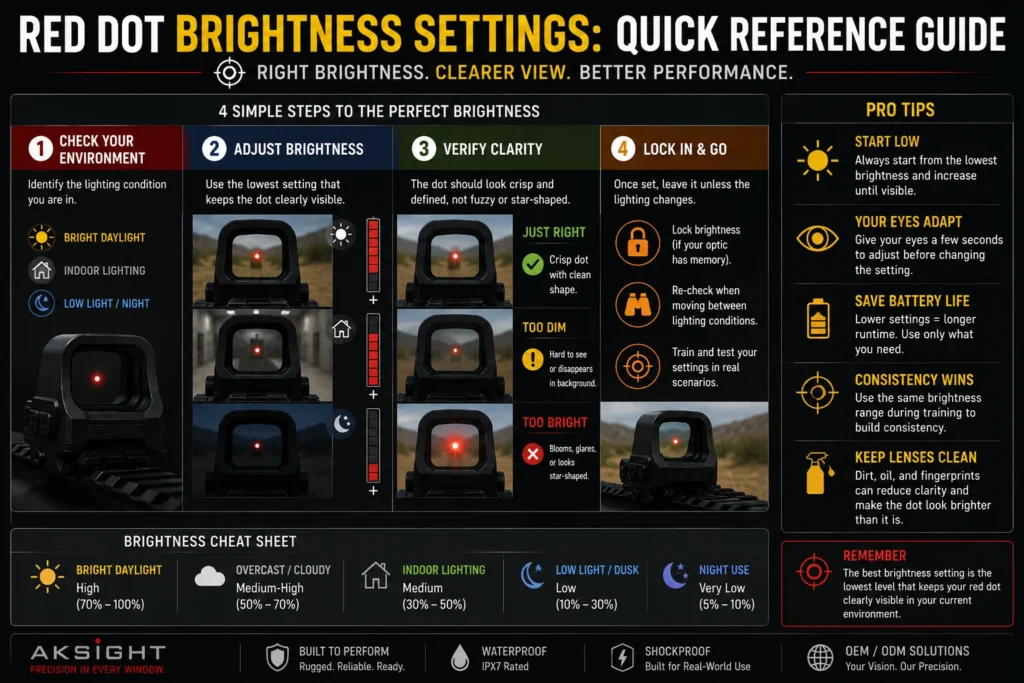
💡 Emitter Quality
The emitter controls how efficiently illumination projects onto the lens.
Low-quality emitters often create inconsistent brightness, irregular dot shapes, and excessive bloom at higher settings.
🪞 Lens Coatings
Lens coatings strongly affect reticle visibility and contrast.
High-quality coatings improve light transmission while maintaining a cleaner aiming point.
👁️ User Eye Sensitivity
Brightness perception varies between users.
Some users prefer extremely bright reticles, while others prioritize sharper dot definition and lower eye fatigue.
🔋 Battery Efficiency
Brightness output directly affects power consumption.
Higher brightness settings reduce runtime, especially in compact optics with smaller battery compartments.
📊 5. Recommended Brightness Levels by Environment
| Environment | Recommended Brightness | Main Goal |
|---|---|---|
| ☀️ Bright Sunlight | High | Maximum visibility |
| ⛅ Overcast Outdoor | Medium-High | Balanced clarity |
| 🏠 Indoor Range | Medium | Sharp reticle appearance |
| 🌙 Low-Light | Low | Reduce glare and bloom |
| 🌌 Night-Compatible Use | Very Low | Maintain target visibility |
👥 6. Which Brightness Setup Fits Different Users?
| User Type | Recommended Brightness System | Why It Fits |
|---|---|---|
| Beginner users | Manual brightness | Simple and predictable control |
| Dynamic environments | Auto brightness | Fast adaptation to changing light |
| Outdoor-focused users | High-output daylight system | Improved visibility in sunlight |
| Low-light users | Fine low-light settings | Reduced bloom and glare |
| OEM/ODM buyers | Hybrid brightness architecture | Broader commercial flexibility |
🛡️ 7. Brightness Control and OEM/ODM Optic Design
For OEM and wholesale optics manufacturing, brightness systems are a major product differentiation factor.
Buyers increasingly evaluate:
- 🌡️ Brightness adjustment range
- 🔋 Power efficiency
- ⚡ Auto-brightness responsiveness
- 🌙 Night-compatible settings
- 🧩 Button and interface durability
- 💧 Environmental sealing around controls
At AKSIGHT, illumination systems are optimized for outdoor visibility, low-light usability, and long-term durability across OEM and ODM production projects.
❓ 8. FAQ: Red Dot Brightness Settings
Why does my red dot look blurry?
The brightness level is likely too high. Lower settings usually improve reticle sharpness.
What brightness should I use outdoors?
Use the lowest brightness setting that remains clearly visible in sunlight.
Do brighter settings reduce battery life?
Yes. Higher brightness output increases power consumption.
Are green reticles brighter than red?
Many users perceive green reticles as brighter during daylight conditions.
Is auto brightness better than manual adjustment?
It depends on user preference. Manual systems provide more consistent control, while auto systems improve convenience.
Can excessive brightness reduce accuracy?
Yes. Blooming and glare can make the reticle appear larger than intended.
📌 Final Thoughts
Understanding red dot brightness settings is essential for maximizing optic performance. A properly adjusted reticle improves visibility, speed, precision, and overall user comfort.
Brightness control is not just a convenience feature. It directly affects how effectively the optic performs across real-world environments.
Whether designing OEM optics, sourcing private-label products, or selecting a personal-use red dot sight, illumination quality remains one of the most important evaluation criteria.
Readers interested in compact optics, enclosed emitter systems, and OEM-ready red dot solutions can browse the full AKSIGHT red dot lineup for additional product information.
📚 References
- Optical illumination principles — Edmund Optics: https://www.edmundoptics.com/
- Human visual brightness sensitivity — standard photopic response references
- Lens coating transmission principles — optical engineering references
- LED emitter efficiency standards in modern reflex optics